
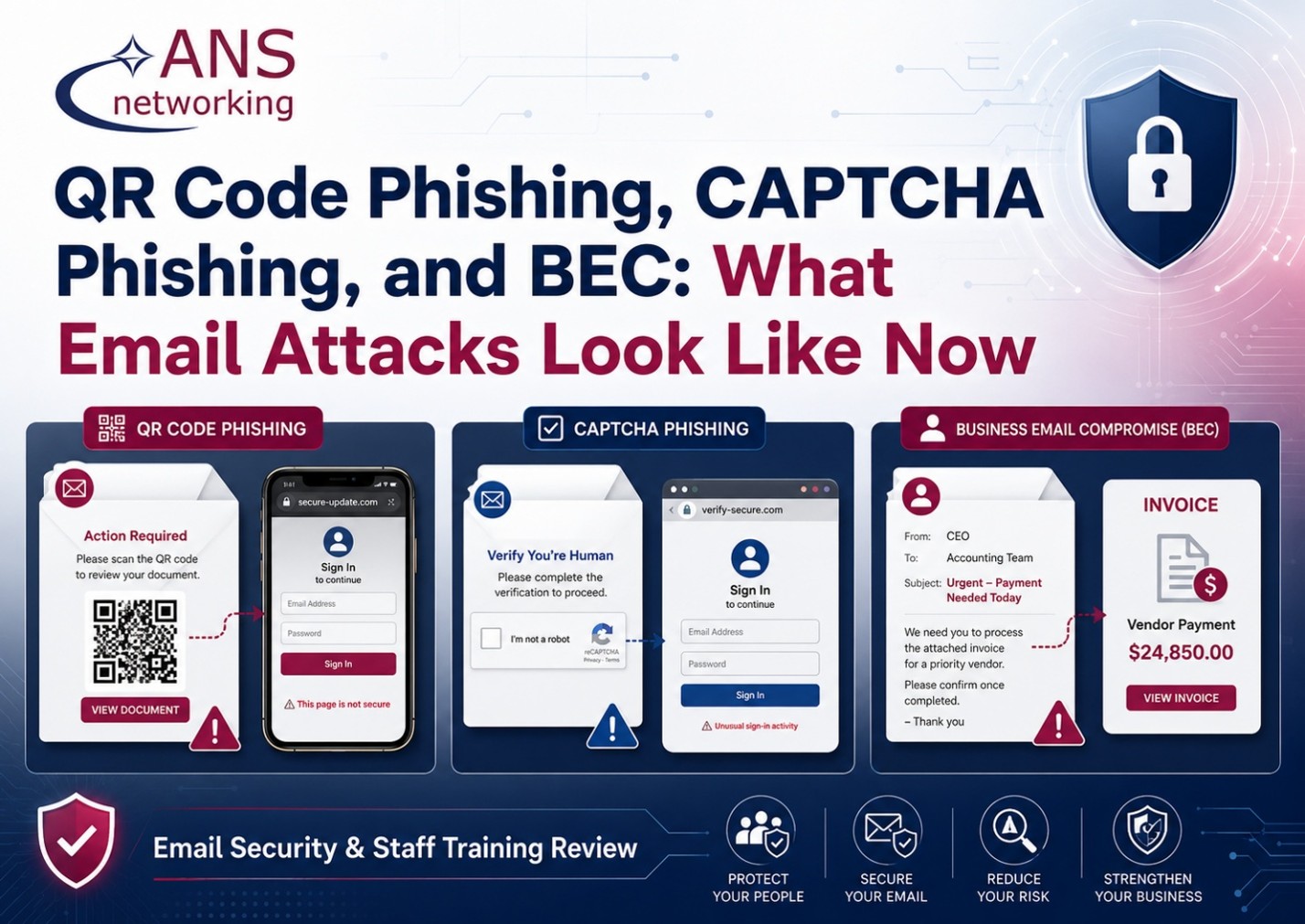
Email attacks have changed.
For years, most people were taught to look for obvious warning signs: bad spelling, strange attachments, suspicious links, or an email from a prince asking for money. Those attacks still exist, but many of today’s phishing campaigns look far more legitimate.
Cybercriminals are increasingly using QR codes, CAPTCHA pages, realistic Microsoft 365 login screens, and carefully written business emails to get around traditional security controls and convince employees to take the next step themselves.
Microsoft’s Q1 2026 email threat research shows just how significant this problem has become. The company observed approximately 8.3 billion email-based phishing threats during the quarter, while QR-code phishing became one of the fastest-growing attack methods. Microsoft also reported approximately 10.7 million business email compromise attacks during the same period.
For small and midsize organizations, the important takeaway isn’t the number itself. It’s that email attacks are increasingly designed to look like normal business activity.
QR Code Phishing: When the Link Is a Picture
QR codes are convenient because they move someone quickly from an email or document to a website.
Attackers know that too.
A QR-code phishing email may appear to come from Microsoft, a delivery company, a financial institution, an HR department, or another familiar source. Instead of asking the recipient to click a traditional hyperlink, the message tells them to scan a QR code with their phone.
The QR code might claim that you need to:
- Review a secure document
- Reset an expiring password
- Verify a Microsoft 365 account
- Listen to a voicemail
- Approve a payment
- View an invoice
Once scanned, the QR code sends the employee to a fraudulent login page designed to capture their username and password.
Microsoft reported that QR-code phishing more than doubled during Q1 2026, making it the fastest-growing email attack vector by the end of the quarter.
This technique can be particularly effective because scanning the code often moves the interaction from a protected company computer to an employee’s mobile device. The employee may also focus on the QR code itself instead of asking where it actually leads.
For an office manager, CPA, insurance agency, medical practice, nonprofit, or small business owner, the rule should be simple:
A QR code in an email should be treated exactly like a link in an email.
Before scanning it, ask whether you were expecting the message and whether there is another way to reach the service directly.
CAPTCHA Phishing: “Prove You’re Human”
Most people recognize CAPTCHA screens.
You visit a website and see a checkbox saying, “I’m not a robot,” or you’re asked to complete a quick verification step.
Because CAPTCHAs are associated with legitimate websites, they create a sense of trust.
Attackers are taking advantage of that.
Microsoft observed phishing campaigns where users were first sent to a page containing a CAPTCHA or security check. After completing it, the victim was redirected to a fraudulent sign-in page designed to steal credentials. Microsoft reported that CAPTCHA-gated phishing activity jumped sharply in March 2026, reaching approximately 11.9 million attacks that month.
The psychology is clever.
Once someone completes a CAPTCHA, they may subconsciously assume the next page is legitimate.
It isn’t necessarily.
A CAPTCHA simply proves that someone placed a CAPTCHA on a website. It does not prove that the website belongs to Microsoft, your bank, your insurance carrier, or anyone else.
Employees should be trained to continue evaluating a website even after completing a security check.
Business Email Compromise: No Malware Required
Business Email Compromise, commonly called BEC, can be even harder to identify because there may be no suspicious attachment, malicious file, or obviously fake website involved.
Instead, the attacker relies on trust.
Microsoft defines BEC as an attack in which someone impersonates a trusted individual or organization to persuade an employee to send money or sensitive information. Microsoft recorded roughly 10.7 million BEC attacks during Q1 2026 alone.
Imagine receiving an email that appears to come from your company president:
“Can you process this payment before 3:00? I’m heading into a meeting and won’t be available.”
Or an email that appears to come from a vendor:
“We’ve changed banks. Please use the attached routing information for future payments.”
Or perhaps an employee sends payroll:
“I switched banks. Can you update my direct deposit information before Friday?”
Every one of those messages could be legitimate.
That is exactly why they work.
For accounting firms, insurance agencies, healthcare organizations, nonprofits, and professional offices, a successful BEC attack can result in fraudulent wire transfers, altered payroll deposits, stolen tax information, exposed client data, or compromised vendor relationships.
The best defense is often procedural rather than technical.
Changes involving money, banking information, payroll, sensitive records, or unusual requests should be independently verified using a known phone number or another trusted communication method.
Your Employees Are Part of Your Security System
Technology still plays an essential role.
ANS Networking takes a proactive approach to cybersecurity that includes continuous monitoring, network security, endpoint detection and response, threat detection, security updates, patching, and other layered defenses intended to reduce business risk.
ANS also works with businesses throughout New Hampshire, Northern Massachusetts, and Southern Maine on cybersecurity, managed IT, Microsoft 365, network security, backup and disaster recovery, cloud solutions, and related IT needs.
But no security product eliminates the need for people to recognize suspicious behavior.
Modern phishing frequently relies on convincing a legitimate employee to perform a legitimate action in the wrong place.
Scan this code.
Complete this CAPTCHA.
Sign into Microsoft 365.
Approve this payment.
Change this bank account.
That is why staff education should be treated as part of cybersecurity—not as an annual checkbox.
Employees should understand what modern attacks actually look like, how to verify unusual requests, and what to do when something feels wrong.
When Was the Last Time You Reviewed Your Email Security?
If your organization hasn’t reviewed its email security and employee phishing awareness recently, now is a good time.
ANS Networking can help evaluate your current cybersecurity environment, identify potential weaknesses, and discuss practical ways to strengthen both your technical defenses and your employees’ ability to recognize modern email threats.
Contact ANS Networking to schedule an email security and staff training review.
The goal isn’t to make employees afraid of every email they receive.
It’s to make sure your team knows when to stop, verify, and ask before a convincing message becomes an expensive problem.